
Operations
Local Server ERP vs Cloud ERP: Why Internet-Independent Business Software Still Matters in 2026
The future of business software isn't necessarily in the cloud. For many businesses, the smartest technology decision may be keeping critical operations closer to home.
On this page
- Key takeaways
- What Is a Local Server ERP?
- What Is Cloud ERP?
- Local Server ERP vs Cloud ERP: Key Differences
- Why Local Server ERP Can Be Better for Daily Business Operations
- Data Security and Backup: Is Cloud Really Safer Than Local ERP?
- What About Server Crashes? Understanding Automatic Recovery
- The Biggest Misconception: Modern ERP Must Be Cloud-Based
- Local-First, Cloud-Connected: A Practical Middle Ground
- Maya ERP: A Modern Approach to Local-First Business Software
- Local Server ERP vs Cloud ERP: Which Is More Cost-Effective?
- When Cloud ERP Is the Better Choice
- Why Local-First ERP Makes Sense for Pharmaceutical Wholesalers
- How to Choose Between Local Server ERP and Cloud ERP
- Frequently asked questions
- Conclusion: The Best ERP Is the One That Keeps Your Business Running
- About Maya Nexus Technologies
Imagine a busy pharmaceutical distribution business on a Monday morning.
It's 10:30 AM. Five billing counters are operational. Retailers are waiting for their medicine orders, sales invoices are being generated, and warehouse employees are preparing shipments.
Everything is running smoothly.
Then, without warning, the internet connection goes down.
The billing team refreshes its software. Nothing happens.
Someone restarts the router. Another employee calls the internet service provider. Meanwhile, invoices are pending, customers are waiting, and deliveries are getting delayed.
The internet provider estimates that connectivity may take another two hours to restore.
For a business that depends entirely on a cloud-based ERP system without offline capabilities, this situation can disrupt operations.
But what if the business software didn't need the internet to perform its most important functions?
What if sales billing, inventory management, accounting, purchases, and financial reporting could continue normally—even when the outside world was disconnected?
This is where Local Server ERP systems offer a compelling alternative to Cloud ERP.
For years, the software industry has promoted cloud computing as the inevitable future of business technology.
Cloud platforms have certainly transformed how organizations operate. They provide remarkable flexibility, accessibility, and scalability.
But an important question has received far less attention:
Does every business really need to depend on the internet to run its daily operations?
The answer is more complicated than most software advertisements suggest.
And for pharmaceutical wholesalers, medical distributors, retailers, and businesses operating from physical locations, it is a question worth examining carefully.
Key takeaways
- Offline-capable local ERP keeps core transactions on the LAN; power, server and network availability still matter.
- Cloud ERP supports distributed access and provider-managed infrastructure; offline capability varies by product.
- Security, verified backups, transaction integrity and total cost matter in either architecture.
What Is a Local Server ERP?
A Local Server ERP (Enterprise Resource Planning) system is business management software that runs on computing infrastructure located within a company's own premises.
Instead of storing its primary operational database on a distant cloud server, the ERP stores and processes business transactions on a local server.
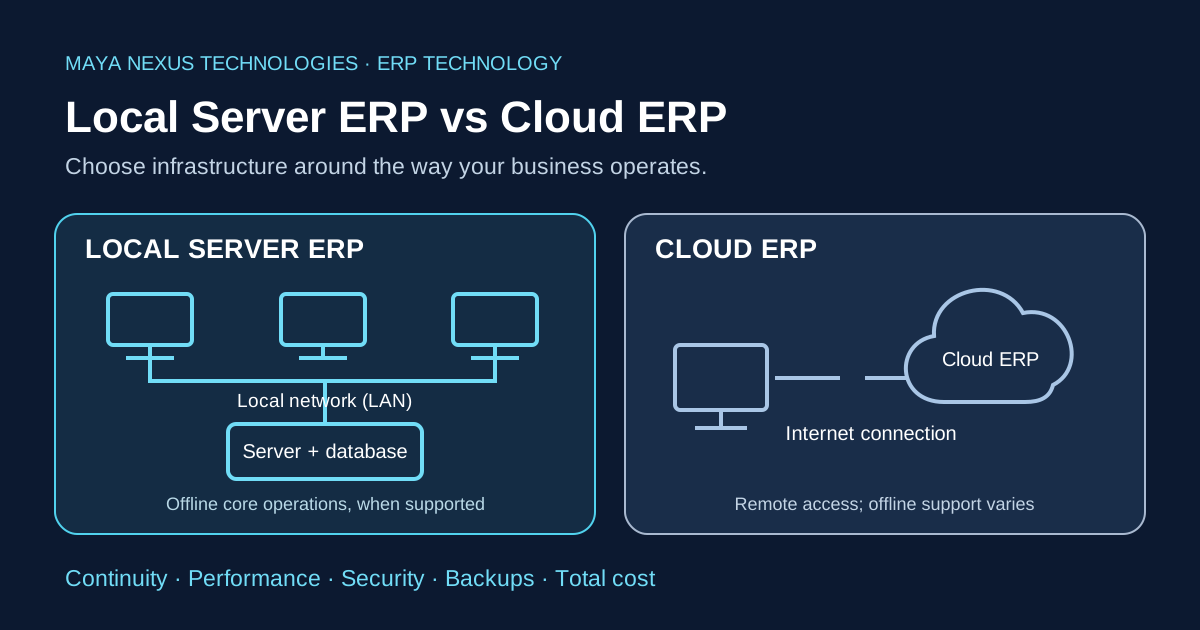
Other computers within the organization can connect to this server through a Local Area Network (LAN).
Consider a pharmaceutical wholesale agency with five computers.
The company installs its ERP server on a designated computer. All five billing counters connect to that server through the same local network.
When an employee creates a sales invoice, the transaction is processed by the local application and database.
The request doesn't need to travel through the public internet.
The database, application server, and connected workstations operate within the organization's own network.
As a result, a properly designed Local Server ERP can continue performing its core business functions even when the internet connection is unavailable.
However, the local server, internal network, and power supply must remain operational.
How Local Server ERP Works
A typical architecture looks like this:
Billing Computers → Local Network → ERP Server → Local Database
The internal network may use Ethernet cables, Wi-Fi, or a combination of both.
The important distinction is that core transactions remain within the business's network.
A modern Local Server ERP is not necessarily an outdated desktop application.
It can use a modern web-based interface, relational databases, secure application programming interfaces, and automated recovery mechanisms.
The location of the server does not determine whether the software is modern.
Its architecture, reliability, security, and capabilities do.
What Is Cloud ERP?
A Cloud ERP is an enterprise resource planning system hosted on cloud infrastructure and accessed over a network, typically through the internet.
Instead of maintaining the primary application server and database inside the business premises, the organization uses infrastructure managed by an external provider.
Employees commonly access the software using a web browser or dedicated application.
For example, when a user creates an invoice in an internet-dependent Cloud ERP, the request is sent to a remote application server.
The server processes the transaction and communicates with the cloud database before returning a response.
The typical architecture is:
Billing Computer → Internet → Cloud Application Server → Cloud Database
Cloud ERP systems offer significant benefits.
Employees can access business information from different locations, provided the application allows it. Infrastructure maintenance is generally handled by the provider, and computing resources can often be expanded without purchasing additional local hardware.
The U.S. National Institute of Standards and Technology (NIST) identifies broad network access, resource pooling, and rapid elasticity among the fundamental characteristics of cloud computing. NIST definition of cloud computing
These advantages make cloud technology valuable for many organizations.
However, cloud accessibility also introduces a dependency that businesses must understand.
If an ERP requires a live internet connection for every transaction, internet availability becomes part of its operational requirements.
Some cloud ERP products offer offline modes or local synchronization capabilities, so internet dependency must be evaluated product by product.
Local Server ERP vs Cloud ERP: Key Differences
Before deciding which system is better, businesses should understand what actually changes between the two architectures.
| Comparison Factor | Local Server ERP | Cloud ERP |
|---|---|---|
| Server Location | Business premises | Remote cloud infrastructure |
| Primary Database | Local server | Cloud server |
| Internet Requirement | Not required for properly designed offline operations | Generally required unless offline mode exists |
| Billing During Internet Outage | Can continue over LAN | Depends on offline support |
| Multi-Computer Access | Through local network | Through internet or supported network connections |
| Transaction Latency | Low-latency LAN communication possible | Depends on network and infrastructure |
| Data Infrastructure Control | Direct local control | Provider-managed infrastructure |
| Hardware Maintenance | Business or support provider | Cloud provider |
| Remote Accessibility | Requires a secure remote-access solution | Usually built into the service |
| Backup Responsibility | Business and ERP provider | Depends on service agreement |
| Scalability | Depends on local hardware capacity | Often easier to expand |
| Cost Structure | Hardware, software, support, and maintenance | Usually subscription and service costs |
| Internet Independence | Major potential advantage | Product-dependent |
Neither architecture is universally superior.
The right choice depends on how a business operates, where its employees work, and which technical dependencies it can tolerate.
For businesses that operate primarily from one physical location, the differences become particularly important.
Why Local Server ERP Can Be Better for Daily Business Operations
4.1. Business Continuity Without Internet Dependency
Internet connectivity has become essential to modern business.
Businesses use it for banking, communication, payments, tax filing, customer interactions, and countless other activities.
But not every internal operation needs to depend on an internet connection.
Consider a medical distributor generating hundreds of invoices every day.
The business already has its product database, customer records, pricing information, inventory, and accounting system.
Why should an internet outage necessarily prevent employees from accessing information stored within their own premises?
In a properly designed local-first ERP, it doesn't have to.
Sales transactions can continue through the local network. Employees can create purchase entries, review stock, check customer balances, and generate reports.
All these operations can function without connecting to an external server.
The Hidden Cost of Internet-Dependent Billing
When software becomes unavailable, the financial impact extends beyond the immediate interruption.
Employees may remain idle.
Customer queues can increase.
Warehouse dispatches may be delayed.
Sales representatives may be unable to confirm order status.
In businesses handling time-sensitive deliveries, these interruptions can affect customer satisfaction and operational efficiency.
The exact financial loss varies from business to business, but the underlying issue is universal:
Software availability should not become an unnecessary obstacle to business continuity.
A Local Server ERP reduces one important point of dependency: the external internet connection.
It does not eliminate other risks, such as local power failures or server hardware problems.
Nevertheless, removing internet connectivity from the critical billing path can make a substantial operational difference.
4.2. Local Network Performance and Faster Response Potential
Performance is one of the most frequently discussed advantages of local computing.
But the subject deserves a more technical explanation.
When a cloud application processes a transaction, information must travel between the user's device and the remote infrastructure.
That journey introduces network latency.
Latency is the time required for data to travel from one point to another and for a response to return.
With a local server, communication generally takes place across a much shorter network path.
A properly configured LAN can provide very low communication latency.
This becomes especially relevant when an application performs numerous small requests during everyday operations.
Consider a pharmaceutical billing workflow.
An operator searches for a product, selects a batch, checks the available quantity, retrieves the selling rate, and adds the item to an invoice.
These actions may trigger multiple interactions with the ERP backend.
On a local network, the application does not need to communicate with a geographically distant server for each request.
Does That Mean Local ERP Is Always Faster?
No.
A poorly designed Local Server ERP can be slower than a well-engineered Cloud ERP.
Actual performance depends on database optimization, application architecture, server hardware, concurrent users, network quality, and query efficiency.
A modern cloud platform with powerful infrastructure and effective caching may outperform an underpowered local server.
The correct conclusion is more specific:
Local Server ERP can provide a latency advantage by keeping transaction processing close to users, but actual speed must be established through real performance testing.
Even major cloud providers recognize the relevance of on-premises infrastructure for latency-sensitive applications. Amazon Web Services notes that localized infrastructure can be suitable for workloads requiring direct control and predictable performance. AWS Outposts
For billing-intensive businesses, response consistency can be just as important as maximum speed.
4.3. Greater Control Over Business Data
Business data is not merely a collection of files.
For a pharmaceutical distributor, the ERP database represents years of commercial activity.
It contains customer relationships, supplier information, purchase histories, inventory records, outstanding balances, tax-related transactions, and financial reports.
These records are essential business assets.
In a typical cloud-hosted ERP, the primary database resides on infrastructure managed by the service provider.
The business accesses that information through the software and the provider's available data-management tools.
In a Local Server ERP, the primary operational database resides within the business's own infrastructure.
This provides direct control over the physical location of the database and the systems used to operate it.
However, local storage does not automatically guarantee better data security.
Physical access, user permissions, software updates, database protection, and backup practices all remain important.
A cloud provider may operate a highly sophisticated security environment, while a poorly maintained local computer may be vulnerable to malware or hardware failure.
The real distinction is not simply security.
It is where infrastructure responsibility and operational control reside.
For organizations that want to manage their own primary database while using cloud services selectively, local-first architecture can be particularly attractive.
4.4. Predictable Operations Across Multiple Billing Counters
Many wholesale and distribution businesses work from a single location with several employees performing different tasks.
One person handles purchases.
Another manages sales.
A third monitors outstanding payments.
Warehouse personnel check inventory, while management reviews financial performance.
These employees need access to the same business information.
A LAN-based ERP allows connected devices to communicate with a common local application server and database.
This avoids the need to maintain separate, disconnected databases on every workstation.
It also allows businesses to operate multiple counters without making external internet connectivity a requirement for internal transactions.
For example, a pharmaceutical distributor may have five computers connected to the same local server.
When one counter completes a sale, the transaction can become available to other authorized users through the shared database.
Inventory and accounting records can remain coordinated within the same system.
The exact level of real-time consistency depends on the ERP's transaction architecture.
Nevertheless, a well-engineered local database provides a strong foundation for multi-user operations.
This is particularly useful when a company's primary business activity takes place within one office, shop, warehouse, or distribution center.
Data Security and Backup: Is Cloud Really Safer Than Local ERP?
One of the most common arguments in favor of cloud software is that data stored in the cloud is safer than data stored locally.
There is some truth behind this perception.
Major cloud platforms often provide sophisticated infrastructure, redundancy, monitoring, and disaster-recovery capabilities.
However, cloud hosting alone does not guarantee that business data is properly backed up or easily recoverable.
Similarly, local storage does not necessarily mean that data is exposed to unnecessary risk.
The more important question is:
What happens when something goes wrong?
The Difference Between Data Storage and Data Protection
A database can be stored locally and protected through several independent backup mechanisms.
It can also be stored in the cloud with insufficient recovery options.
The location of data is only one part of the equation.
A reliable backup strategy should account for hardware failure, accidental deletion, malware, operating system corruption, and other disruptions.
The U.S. Cybersecurity and Infrastructure Security Agency (CISA) recommends the widely used 3-2-1 backup approach: maintain three copies of important data, use two different storage media, and keep one copy off-site. CISA data backup options
This principle can be applied to both local and cloud-based systems.
Why Local and Cloud Backups Work Better Together
Consider an ERP system that stores its primary database locally.
The software can create regular local backups for convenient recovery.
It can also upload backup copies to an off-site cloud storage service.
This arrangement offers different layers of protection.
If the internet becomes unavailable, local transactions can continue, and local backups can remain operational.
If the local computer experiences a serious hardware failure, an independently stored off-site backup may provide a recovery path.
But there is an important distinction between having a backup feature and having a reliable recovery strategy.
Businesses must confirm that backups are completing successfully, remain accessible, and can actually be restored.
Backups should also be protected against unauthorized modification or deletion.
What Happens If Windows Becomes Corrupted?
Some locally hosted ERP systems separate application data from the primary Windows installation partition.
For example, the operating system may be installed on the C: drive while ERP application data resides on the D: drive.
If Windows becomes corrupted and only the C: partition is affected, the data on D: may remain intact.
However, using separate drive letters does not guarantee protection against physical disk failure.
If both partitions exist on the same SSD, damage to that SSD may affect both.
A separate partition is not a substitute for an independent backup.
This is why combining local backups with off-site copies is a sensible approach for businesses that depend on their accounting and inventory records.
What About Server Crashes? Understanding Automatic Recovery
Every computer system can fail.
Local servers are no exception.
Applications may unexpectedly stop because of software errors, memory exhaustion, database connection problems, or operating system issues.
Traditional business software often requires manual troubleshooting before operations can resume.
Modern ERP architecture can reduce some of these interruptions through automated recovery mechanisms.
Automatic Service Restart
A server application can be installed as an operating system service.
If that service terminates unexpectedly, a properly configured service manager can attempt to restart it automatically.
This reduces the need for an employee to manually launch the backend process after certain failures.
Database Health Monitoring
A well-designed ERP can periodically verify whether its database connection is healthy.
For example, an application may execute a lightweight database query to confirm that its database is responding.
This provides more meaningful information than simply checking whether the application process is running.
Connection Recovery
If the database becomes temporarily unavailable, the application can detect the interruption and attempt to recover when connectivity returns.
For financial software, however, recovery must prioritize transaction integrity.
An ERP should not blindly repeat financial transactions when it cannot determine whether the original operation completed.
That approach could potentially create duplicate invoices or inconsistent records.
A safer design pauses uncertain operations, verifies database availability, and allows the system to resume while preserving appropriate transaction controls.
These capabilities are often described as elements of a self-healing software architecture.
However, automatic process recovery should never be confused with guaranteed recovery from database corruption, hardware destruction, or ransomware.
Those scenarios require additional protection and potentially a controlled restoration process.
The Biggest Misconception: Modern ERP Must Be Cloud-Based
For much of the last decade, cloud computing has dominated software marketing.
Organizations have been encouraged to move applications, databases, and workflows to remotely hosted infrastructure.
In many situations, the approach makes excellent sense.
But cloud adoption is an architectural decision—not a universal measure of technological progress.
A modern ERP can operate locally while using technologies commonly associated with contemporary web applications.
It can use a responsive browser-based interface, relational databases, secure APIs, automated backups, and carefully designed transaction-processing systems.
It can also connect to external services when connectivity is available.
None of these capabilities inherently requires the primary business database to reside in the cloud.
In fact, modern enterprise architecture increasingly recognizes that different workloads benefit from different deployment environments.
Some applications benefit from centralized cloud infrastructure.
Others benefit from being located close to the people, machines, or processes that use them.
The goal should not be to choose the cloud simply because it is fashionable.
It should be to choose an architecture that supports the actual requirements of the business.
Modernization is about improving business capability, not merely changing server location.
Local-First, Cloud-Connected: A Practical Middle Ground
The choice between local and cloud infrastructure does not have to be absolute.
A business can operate its critical transaction-processing systems locally while using cloud services for selected functions.
This model is often described as a local-first, cloud-connected architecture.
Its underlying principle is straightforward:
Keep essential business operations independent of the internet. Use cloud connectivity where it adds genuine value.
For example, sales billing, purchasing, inventory, and accounting can operate on a local server.
Meanwhile, internet connectivity can support external integrations, off-site backups, software updates, and communication between organizations.
The difference is architectural.
In a cloud-dependent application, online connectivity may be necessary before a transaction can be completed.
In a local-first application, external connectivity can be an additional capability rather than a prerequisite for normal operations.
This distinction can be particularly valuable for businesses that operate primarily from fixed physical locations but also want access to selected online services.
The approach is not suitable for every organization.
Companies with geographically distributed workforces or complex multi-location operations may benefit more from cloud-native infrastructure.
But for businesses whose primary operations take place within a single local network, the local-first model deserves serious consideration.
Maya ERP: A Modern Approach to Local-First Business Software
One example of this architectural approach is Maya ERP, developed by Maya Nexus Technologies.
Maya ERP is designed to operate with a local application server and database, allowing businesses to perform their core transactions without depending on a continuous internet connection.
Rather than requiring every invoice and inventory operation to pass through a remote cloud server, the software processes daily business operations within the local infrastructure.
Offline Business Operations
Maya ERP supports offline operation for essential business functions, including sales billing, purchase entry, inventory management, accounting, customer and supplier management, and financial reporting.
Connected computers can access the local server through a LAN.
This means a business can continue carrying out these activities during an external internet outage, provided its local infrastructure remains operational.
The software also supports online and offline licensing mechanisms, reducing the need to treat continuous license-server connectivity as a prerequisite for every business transaction.
Local and Cloud Backup Options
Maya ERP provides automatic and manual backup capabilities, with support for local and cloud backup destinations.
Local backups support recovery without requiring an internet connection.
Configured cloud backups provide an additional off-site protection option when online connectivity is available.
The reliability of these protections depends on successful backup completion, appropriate storage configuration, and periodic restore verification.
Automatic Server Recovery
Maya ERP also incorporates service recovery and database health mechanisms.
Its architecture includes Windows service recovery configuration, database connectivity checks, and recovery behavior for certain temporary failures.
These mechanisms are designed to help the system recover from unexpected application interruptions and database connectivity problems.
They are not a guarantee of uninterrupted operation or automatic restoration of a corrupted PostgreSQL database.
MayaConnect: Online Connectivity Without Cloud-Dependent Billing
Another component of the ecosystem is MayaConnect.
MayaConnect enables online ERP-to-ERP ordering between connected businesses.
Unlike core billing and accounting operations, MayaConnect requires internet connectivity for its online communication functions.
This separation illustrates the local-first approach.
The business can continue operating its internal ERP during an internet outage while internet-dependent inter-business communication remains unavailable until connectivity is restored.
The underlying idea is simple:
A business should be able to operate locally and connect globally, without making one completely dependent on the other.
Maya ERP demonstrates how local infrastructure and selective cloud connectivity can coexist within a modern business software ecosystem.
Local Server ERP vs Cloud ERP: Which Is More Cost-Effective?
Cost is often presented as one of the strongest advantages of cloud software.
Cloud ERP can reduce the need to purchase and maintain dedicated server infrastructure.
Many cloud services also use subscription-based pricing, allowing organizations to pay for software access without a large upfront infrastructure investment.
However, recurring subscriptions are not the entire cost of ownership.
Depending on the provider, costs may vary with users, features, storage capacity, usage levels, support requirements, and integrations.
Local Server ERP follows a different economic model.
A business may need suitable computer hardware, a reliable local network, software licensing, backups, and technical support.
It also assumes responsibility for maintaining the local infrastructure.
Neither approach is automatically cheaper.
Think Beyond the Software Subscription
Suppose a business is evaluating ERP software for the next five years.
A meaningful comparison should include the complete cost of operating each solution—not simply the advertised license or subscription price.
For a cloud solution, this may include software subscriptions, additional user charges, premium features, implementation costs, and connectivity requirements.
For a local solution, it may include software licensing, server hardware, electricity, maintenance, backup storage, and technical assistance.
The cost of potential downtime should also be considered.
For some businesses, a cloud subscription may be the most economical option.
For others, an existing local computer and network infrastructure may make a local ERP financially attractive.
The correct metric is Total Cost of Ownership (TCO) over the expected period of use.
A proper decision should also consider performance, reliability, security, and the financial impact of operational interruptions.
When Cloud ERP Is the Better Choice
It would be misleading to suggest that local infrastructure is always the best option.
Cloud ERP has genuine advantages, particularly when employees and business operations are geographically distributed.
A company operating offices across multiple cities may benefit from centralized access to a common cloud application.
A business with remote employees may value the ability to access its software securely from different locations without maintaining its own remote-access infrastructure.
Cloud platforms may also simplify infrastructure scaling.
A growing organization can often expand cloud resources without installing additional hardware at every location.
For businesses that lack the expertise or resources to maintain local servers, provider-managed infrastructure can reduce operational responsibilities.
These are significant advantages.
A business should favor Cloud ERP when remote access, centralized infrastructure management, rapid scaling, and geographically distributed collaboration are more important than local internet independence.
It should also evaluate the provider's security arrangements, service availability commitments, backup policies, and data export capabilities.
The objective is not to reject cloud computing. It is to use the right architecture for the right business requirements.
Why Local-First ERP Makes Sense for Pharmaceutical Wholesalers
Pharmaceutical distribution presents a particularly interesting case for local-first technology.
A medical wholesale agency may operate with multiple billing counters, large product catalogs, batch-specific inventory, expiry dates, purchase records, supplier accounts, and customer outstanding balances.
These operations require accurate and consistent access to business information.
For example, when generating an invoice, the billing system may need to retrieve product information, selling rates, stock quantities, and available batches.
The system must also preserve the relationship between sales, inventory movements, and accounting records.
In this environment, transaction reliability is essential.
A local-first ERP can provide a useful operational advantage by removing public internet connectivity from the normal transaction path.
Employees can continue accessing the local application and database during external connectivity interruptions.
But the benefits depend on the implementation.
The software must still provide appropriate inventory controls, financial accuracy, reliable multi-user transactions, and effective recovery mechanisms.
Local hosting cannot compensate for incorrect accounting logic or unreliable inventory management.
The strongest ERP systems combine sound business rules with dependable infrastructure.
A Note About GST and E-Invoicing
Offline billing capability should not be confused with the ability to complete every statutory compliance process offline.
In India, businesses subject to mandatory GST e-invoicing must report applicable invoices to an authorized Invoice Registration Portal (IRP) and obtain an Invoice Reference Number (IRN).
The GSTN-authorized IRP documentation explains that businesses create invoice details in their ERP or accounting systems and report them to the IRP for registration. IRP guidance on Invoice Reference Numbers
Therefore, even if an ERP can record transactions offline, required online compliance steps must still be completed according to applicable regulations.
A good ERP strategy distinguishes between internal transaction processing and external statutory reporting.
How to Choose Between Local Server ERP and Cloud ERP
Instead of asking which architecture is universally better, business owners should begin with a more practical question:
What must continue working when the internet becomes unavailable?
If the business depends on high-volume billing from one physical location, a local-first ERP may offer an important advantage.
If employees routinely work from multiple cities and need continuous centralized access, Cloud ERP may be more convenient.
A useful evaluation should examine business continuity, software performance, infrastructure maintenance, data protection, regulatory requirements, remote access, and total cost.
A business should also test the software under realistic conditions.
For example, it can disconnect the external internet connection while keeping the LAN operational and verify which features remain available.
It should examine how the system behaves when the backend service stops unexpectedly.
It should verify whether backup files can be restored successfully.
And it should test whether multi-user transactions remain consistent under normal workloads.
Marketing claims alone cannot establish reliability.
A successful ERP evaluation should test real business workflows—not merely compare feature checklists.
Frequently asked questions
Is Local Server ERP better than Cloud ERP?
Local Server ERP can be better for businesses that prioritize internet-independent operations, local infrastructure control, and low-latency LAN communication. Cloud ERP can be more suitable for organizations that require widespread remote access, centralized infrastructure management, and rapid scalability. The better choice depends on operational requirements.
Can Local Server ERP work without the internet?
Yes. A properly designed offline-capable Local Server ERP can perform sales, purchases, inventory, and accounting transactions without internet connectivity. Its local server, application services, and internal network must remain operational. External integrations may still require internet access.
Is Local Server ERP faster than Cloud ERP?
Local Server ERP can offer lower network latency because transactions are processed within the local network. However, overall performance depends on software design, server hardware, database optimization, and concurrent workloads. Neither architecture is automatically faster.
Is data safer in Cloud ERP or Local ERP?
Both architectures can provide strong data protection when properly configured. Cloud systems may benefit from professionally managed infrastructure and redundancy. Local systems can offer direct infrastructure control and independent backups. Security and recovery depend on implementation rather than server location alone.
What happens if a Local ERP server crashes?
A server crash can temporarily interrupt connected workstations. Some modern ERP systems use automatic service restart and database reconnection mechanisms to recover from certain failures. Hardware damage and database corruption may require manual intervention or backup restoration.
Can multiple computers use a Local Server ERP?
Yes. Multi-user Local Server ERP systems allow multiple authorized computers to connect to a common server through a LAN. This arrangement is widely suited to businesses operating several billing or administrative workstations from one location.
Can Local Server ERP use cloud backup?
Yes, if the software supports it. A Local Server ERP can maintain its primary database locally while uploading backup copies to cloud storage. Cloud backup operations require appropriate connectivity, credentials, configuration, and storage availability.
Does Local Server ERP require an internet connection for licensing?
This depends on the software provider. Some products require periodic online verification, while others support offline activation. Maya ERP supports both online and offline licensing mechanisms.
Is Local Server ERP suitable for pharmaceutical distributors?
Yes, it can be particularly useful for pharmaceutical wholesalers that operate multiple billing counters from a single location and prioritize reliable internal access to inventory, batch, sales, and accounting records. The software's industry-specific functionality and transaction accuracy must also be evaluated.
Is Cloud ERP the future of business software?
Cloud technology will continue to play a major role in business computing, but it is not the only viable architecture. Local-first and hybrid approaches allow organizations to place critical workloads where they can operate most effectively while using cloud services where appropriate.
Conclusion: The Best ERP Is the One That Keeps Your Business Running
The debate between Local Server ERP and Cloud ERP is often framed as a competition between traditional and modern technology.
That framing misses the point.
A modern business does not need to place every critical operation on a remote server to benefit from technological innovation.
Cloud computing offers valuable capabilities.
Local infrastructure offers different strengths.
For organizations with distributed teams, cloud-based applications can simplify access and infrastructure management.
For businesses operating from physical locations where billing, inventory, and accounting must remain available throughout the working day, local-first systems can provide an equally compelling approach.
The most important consideration is not where the software is hosted.
It is whether the software supports the way the business actually operates.
Can employees continue working during an internet outage?
Are financial transactions reliable?
Is business data appropriately protected?
Can the system recover from failures?
Can the infrastructure grow with the organization?
These questions matter far more than whether a product carries a cloud label.
Modern ERP architecture should be designed around business requirements—not technology trends.
Solutions such as Maya ERP demonstrate how businesses can combine locally processed transactions with selective online connectivity.
And perhaps that is a more practical vision for the future of business software.
Local performance where it matters. Cloud connectivity where it helps. Business control where it belongs.
Because ultimately, the most valuable ERP isn't the one hosted on the most fashionable infrastructure.
It's the one your business can depend on when it matters most.
About Maya Nexus Technologies
Maya Nexus Technologies develops business software designed to simplify operations for growing businesses.
Its Maya ERP platform combines local server-based transaction processing with modern software architecture, backup capabilities, and optional online connectivity through MayaConnect.
Learn more about Maya ERP and its approach to local-first business management software at Maya Nexus Technologies.
Explore Maya ERP — Local-First Business Software. For pharmaceutical workflows, see batch and expiry management.