
The problem
Medicines expire on the shelf unnoticed.
With MAYA
Near-expiry batches are flagged early, and supplier return lists are built for you.
Early Access: MAYA ERP is free until 31 March 2027. Book a demo →
ERP built for medical stores & pharmacies
GST billing, batch & expiry tracking, purchases, accounts and reports — in one ERP made for medical stores. Runs fully offline and on every counter in your shop at once.
Built for
Why MAYA ERP
The problem
With MAYA
Near-expiry batches are flagged early, and supplier return lists are built for you.
The problem
With MAYA
Bill from several counters at once over LAN, with barcode and keyboard-first billing.
The problem
With MAYA
MAYA runs on your own PC. No internet needed for billing, stock or reports.
Core features
From the first bill of the morning to the GST return at month-end.
Find medicines by barcode or name and create GST invoices in seconds, with batch and expiry picked automatically.
Batch-wise stock, near-expiry alerts and an automatic low-stock reorder list.
Record supplier purchases with batch and expiry, and keep stock updated automatically.
Party ledgers, customer credit, supplier payments — every account in one place.
Daily sales, profit, GST summaries, top sellers and slow movers — in one click.
Offline activation tied to your machine — activate once, then run without internet.
Screens
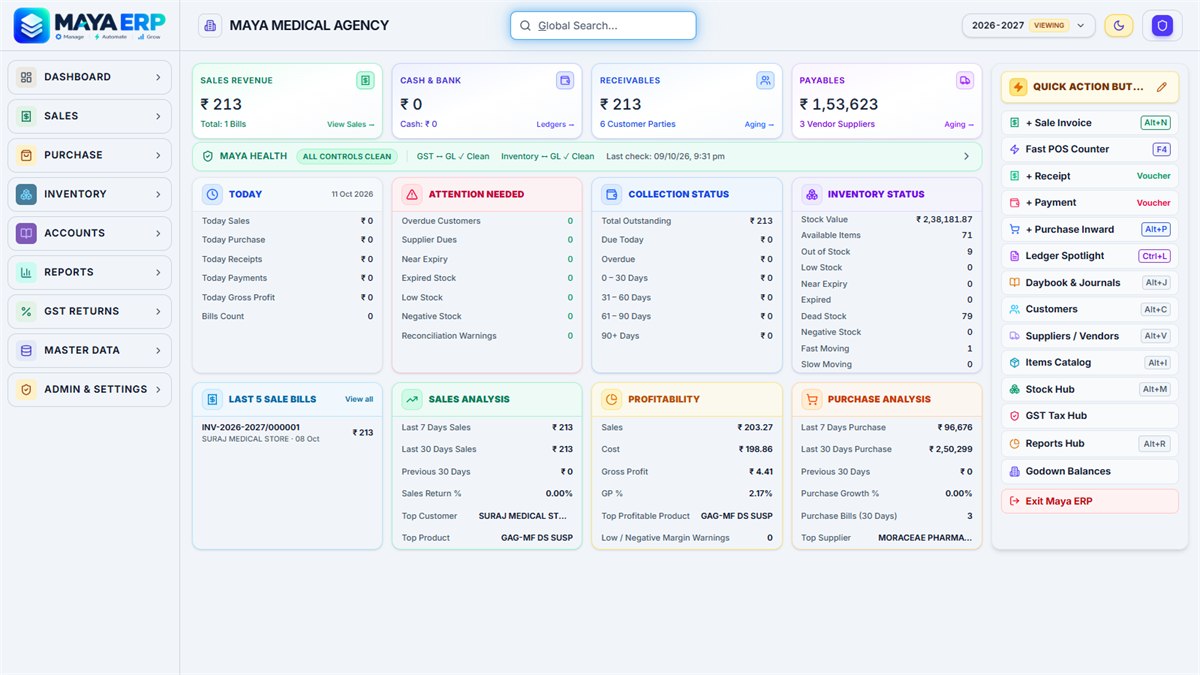
Keyboard-first billing with batch and expiry on every line.
Stock, near-expiry and reorder lists at a glance.
Sales, profit and GST summaries for any date range.
MAYA AI is a built-in assistant. It shows you how to use the software, answers questions from your own stock and sales data, and helps with reports and demand forecasts.
Which medicines expire in the next 30 days?
Here are the batches expiring within 30 days, soonest first.
Shall I prepare a return list for the supplier?
Yes, please.
How it works
Your data stays on your own computer. Billing keeps running even when the internet goes down.
We show you MAYA ERP on a call or at your store.
One installer sets up MAYA ERP and its database. It starts automatically when the PC turns on.
Other computers connect over LAN and bill right from the browser — nothing to install.
When a new version is released, MAYA notifies you and updates in a few clicks.
One installerBrowser-based countersNo internet for billing
Pricing
Every plan includes setup help and software updates.
For stores joining during our launch phase.
₹0 until 31 March 2027
From April 2027 onwards.
₹2,000 / year
Questions about setup or suitability? See full pricing details.
Resources
Short, plain-language articles on batch inventory, GST billing and running several counters.
Ten alternatives compared with features, limits, how each differs from Maya ERP, and a ten-step pharma test.
Read the guide OperationsChoose the main PC, test the network and printers, and keep every counter on one process.
Read the guide GST BillingMap your documents, keep corrections traceable and confirm requirements with your tax professional.
Read the guideFAQ
Yes. Under Early Access, MAYA ERP is free until 31 March 2027. After that, the Annual Plan is ₹2,000 per year.
No. Billing, stock, accounts and reports all run on your own PC. Internet is only needed for optional things like updates.
Install it on one main PC, and other computers in your shop connect to it over your local network (LAN) for billing.
Your data stays on your main PC, inside your store. It is not kept on someone else’s server.
Yes. Every bill is a GST invoice, and GST summaries and return reports are generated from your sales.
A built-in assistant that answers how-to questions and questions about your own stock and sales, and gives early alerts for reorders and expiry.
Free demo
Leave your details and we’ll call you and walk you through a free demo.